ProxyAddress AD Attribute how to not remove existing values

Hi,

Question. I have the following configured for AD attribute “ProxyAddress”.

however, it will remove existing entry for proxyaddress and add what config to sync.

How would I set up a sync to add additional proxyaddress values and leave existing values?

this is what I have so far but it remove existing values already set in ProxyAddress attribute:

anyone can help with this?

Did you ever figure this out? I’m having the same issue and can’t seem to come up with a valid solution.

Late to the party but I had a somewhat similar issue and this is what I used to fix it.

I used a condition to check if “User.proxyAddress” is null or not.

If its null, then add the initial smtp values. If its not null, then either Ignore or set the same value.

This way, I can manually add aliases (which we offer to our users) and the ConnectToAD sync wont touch that field after it sets the initial proxy addresses for the new hire.
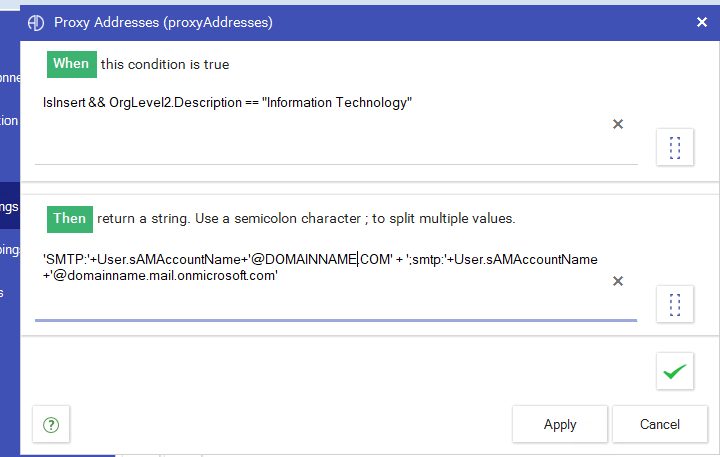

Try adapting your condition to check if the value is null or not. I hope this helps.

1 Like